 AI Agent — automate conversations and workflows. Now available on Free plan


How to Update a Group Dialog in an Android Chat App

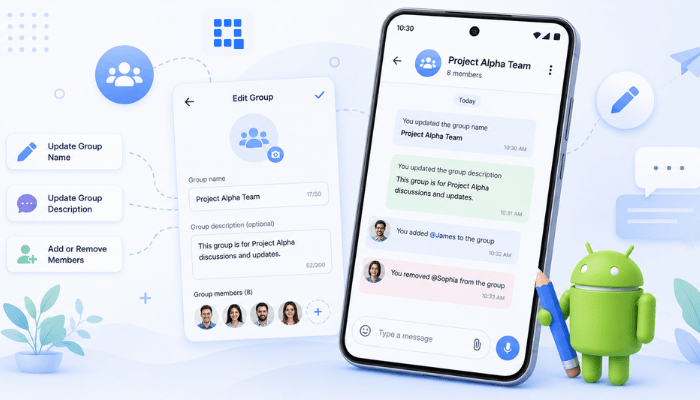
You can update a group dialog in an Android chat app with the QuickBlox Android SDK using QBRestChatService.updateChatDialog(). Depending on what you need to change, you can use QBDialogRequestBuilder to add or remove participants, or update properties of the QBChatDialog object to change the dialog name or image.
In this tutorial, you’ll learn how to:
- add a participant to a group dialog;
- remove a participant;
- rename a group dialog;
- update a group dialog image.
Prerequisites
Before you begin, make sure you have:
- A QuickBlox account and application.
- The QuickBlox Android SDK installed and initialized.
- Users authenticated with QuickBlox.
- An existing group dialog that you can update.
If you haven’t set up the QuickBlox Android SDK yet, follow the QuickBlox Android SDK Quick Start guide to install and initialize the SDK, authenticate a user, and connect your Android app to chat.
Understand How Group Dialog Updates Work
In the QuickBlox Android SDK, a group chat is represented by a QBChatDialog.
To update a group dialog, use QBRestChatService.updateChatDialog():
QBDialogRequestBuilder requestBuilder = new QBDialogRequestBuilder();

QBRestChatService.updateChatDialog(groupDialog, requestBuilder).performAsync(new QBEntityCallback<QBChatDialog>() {
    @Override
    public void onSuccess(QBChatDialog dialog, Bundle args) {
        // dialog updated
    }

    @Override
    public void onError(QBResponseException e) {
        // something wrong happened
    }
});
The updateChatDialog() method accepts two arguments:
groupDialog— the dialog you want to update.requestBuilder— aQBDialogRequestBuilderobject that can be used to add or remove users.
The result of the operation is returned through QBEntityCallback.
Handle a successful update
The onSuccess() method is called when the dialog has been updated successfully:
public void onSuccess(QBChatDialog dialog, Bundle args) {
    // dialog updated
}
The method provides:
dialog— the updated dialog containing the new data.args— an additional object that can contain supplementary information. It isn’t used in this example.
Handle an update error
The onError() method is called if the dialog cannot be updated:
public void onError(QBResponseException e) {

    // something wrong happened

}
You can use the QBResponseException object to get details about the error.
Add a Participant to a Group Dialog
To add users to an existing group dialog, create a QBDialogRequestBuilder and call its addUsers() method:
QBDialogRequestBuilder requestBuilder = new QBDialogRequestBuilder();
requestBuilder.addUsers(users);

QBRestChatService.updateChatDialog(groupDialog, requestBuilder).performAsync(new QBEntityCallback<QBChatDialog>() {
    @Override
    public void onSuccess(QBChatDialog dialog, Bundle args) {
        // dialog updated
    }

    @Override
    public void onError(QBResponseException e) {
        // something wrong happened
    }
});
The key line is:
requestBuilder.addUsers(users);Call addUsers() on the requestBuilder object and pass either an array of user objects or an array of user IDs.
Once the update succeeds, the users are added to the group dialog.
Remove a Participant from a Group Dialog
To remove users from an existing group dialog, use the removeUsers() method:
QBDialogRequestBuilder requestBuilder = new QBDialogRequestBuilder();
requestBuilder.removeUsers(users);

QBRestChatService.updateChatDialog(groupDialog, requestBuilder).performAsync(new QBEntityCallback<QBChatDialog>() {
    @Override
    public void onSuccess(QBChatDialog dialog, Bundle args) {
        // dialog updated
    }

    @Override
    public void onError(QBResponseException e) {
        // something wrong happened
    }
});
As with addUsers(), you can pass either an array of user objects or an array of user IDs to removeUsers().
Rename a Group Dialog
You can also update properties of the QBChatDialog itself.
To rename a group dialog, call setName() on the groupDialog object before updating the dialog:
groupDialog.setName("Here will be our new dialog name");

QBRestChatService.updateChatDialog(groupDialog, new QBDialogRequestBuilder()).performAsync(new QBEntityCallback<QBChatDialog>() {
    @Override
    public void onSuccess(QBChatDialog dialog, Bundle args) {
        // dialog updated
    }

    @Override
    public void onError(QBResponseException e) {
        // something wrong happened
    }
});
The setName() method accepts a string containing the new dialog name:
groupDialog.setName("Common class chat");In this case, you don’t need to add or remove users, so you can pass an empty QBDialogRequestBuilder to updateChatDialog().
Alternatively, you can pass null instead of the QBDialogRequestBuilder object.
Update a Group Dialog Image
To change the image associated with a group dialog, use the setPhoto() method:
groupDialog.setPhoto("photo link");

QBRestChatService.updateChatDialog(groupDialog, new QBDialogRequestBuilder()).performAsync(new QBEntityCallback<QBChatDialog>() {
    @Override
    public void onSuccess(QBChatDialog dialog, Bundle args) {
        // dialog updated
    }

    @Override
    public void onError(QBResponseException e) {
        // something wrong happened
    }
});
As with renaming a dialog, no users are being added or removed, so you can pass an empty QBDialogRequestBuilder or null.
The setPhoto() method accepts a string containing the link to the image you want to use:
groupDialog.setPhoto("photo link");Note: Pass a link to the image rather than the image itself in binary format.
You’ve now learned how to use the QuickBlox Android SDK to:
- add users to a group dialog;
- remove users from a group dialog;
- rename a group dialog;
- update a group dialog image.
Next Steps
There’s plenty more you can build with the QuickBlox Android SDK. Explore the resources below to learn more about adding and customizing chat features in your Android app and working with the SDK.
- QuickBlox Android SDK source code and samples on GitHub — https://github.com/QuickBlox/quickblox-android-sdk
- Android SDK documentation — https://docs.quickblox.com/sdks/android-quick-start
- QuickBlox Developer Discord Community — https://discord.com/invite/3cKRunq8ZZ
Frequently Asked Questions
How do I update a group chat in an Android app using QuickBlox?
Use QBRestChatService.updateChatDialog() to update a QBChatDialog. You can use QBDialogRequestBuilder to add or remove users, or modify properties of the QBChatDialog object to change details such as its name or image.